





Description
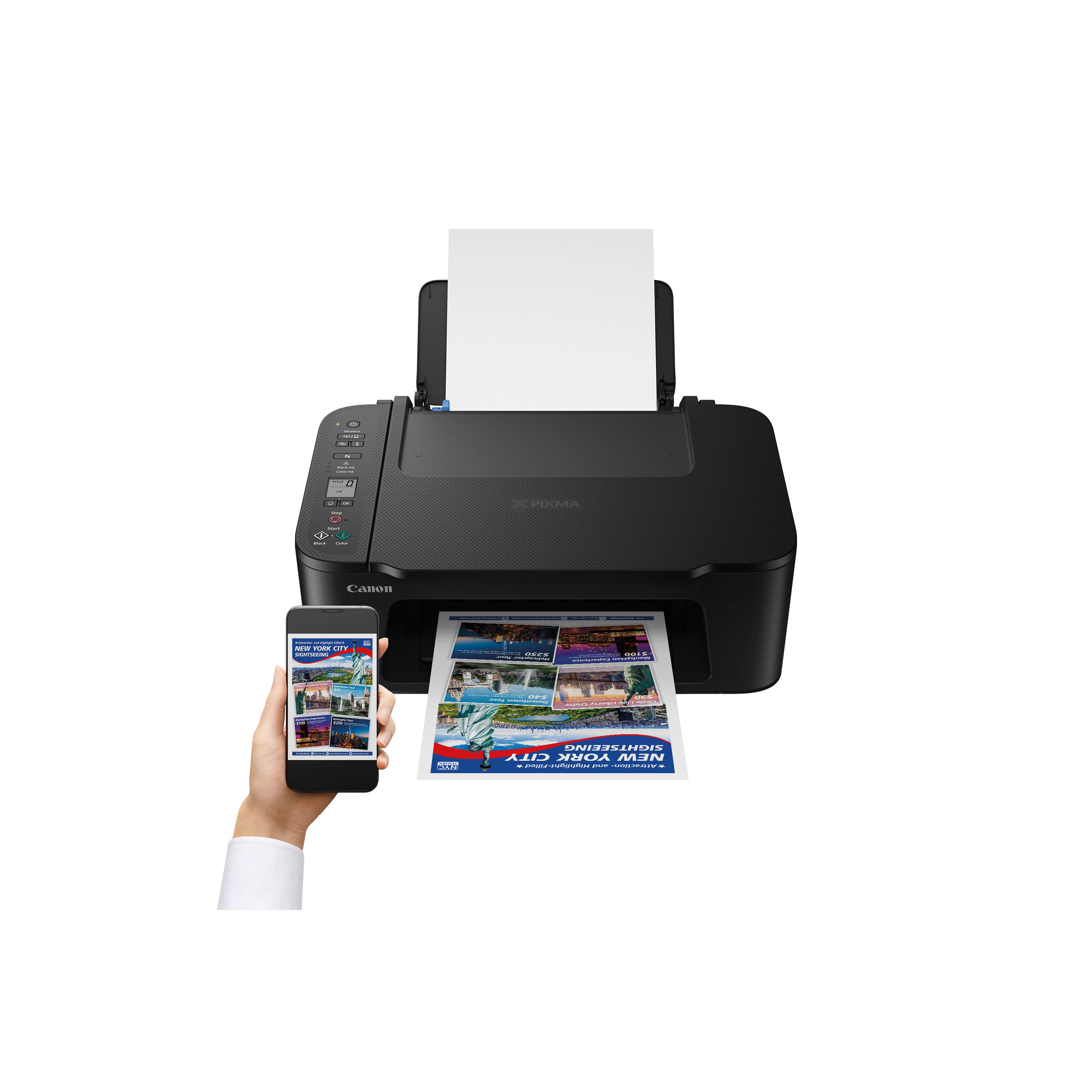
Canon PIXMA TS3750i is a compact, easy-to-use all-in-one inkjet printer designed for home users, students and small offices needing reliable everyday printing, scanning and copying. It uses Canon’s FINE inkjet technology to deliver crisp monochrome text and vibrant colour prints with a maximum print resolution of up to 4800 × 1200 dpi. The TS3750i features straightforward wireless setup and mobile printing support so you can print directly from smartphones, tablets and laptops without cables. It also supports borderless photo printing up to 5 × 7 inches for casual creative work.
With compact dimensions and intuitive controls shown on a 1.5 inch LCD screen, the TS3750i is ideal as a first printer or a flexible household all-rounder that balances quality with affordability.
Key Features and Benefits
All-in-one functionality
Print, scan and copy from one compact device.
Wireless and mobile printing
Print using Wi-Fi or directly from mobile devices via the Canon PRINT app, Apple AirPrint and Mopria.
High-quality prints
Up to 4800 × 1200 dpi resolution ensures detailed documents and colourful images.
Compact design
Space-saving footprint suits desks, shelves or busy home spaces.
Borderless photo printing
Capable of borderless prints on select media, making it useful for photos and creative prints.
Easy setup and use
One-touch wireless connection and intuitive menus simplify setup for beginners.
Flexible media support
Handles plain paper, glossy photo paper and speciality media such as restickable or magnetic papers.
Instructions for Use
Unbox and position the printer
Remove protective packaging and place the printer on a stable surface near a power outlet.
Install ink cartridges
Open the cartridge compartment and insert the supplied black and colour cartridges as marked.
Connect to power and network
Plug in the power cable and switch on the printer. Follow prompts on the display to connect via Wi-Fi or use the wireless connect button.
Install software and drivers
Download the latest drivers and support software from the Canon UK support website and follow on-screen prompts to install.
Load paper
Open the rear paper tray and adjust the guides to fit A4 or other supported paper sizes. Load plain paper or specialised media.
Print, scan and copy
From your device’s print menu select the TS3750i to print. Use Canon software or on-device commands to scan and copy documents.
Comparison Table
| Feature | Canon PIXMA TS3750i | Canon PIXMA TS3350 BK |
|---|---|---|
| Functions | Print, scan, copy | Print, scan, copy |
| Print technology | Colour inkjet | Colour inkjet |
| Maximum print resolution | Up to 4800 × 1200 dpi | Up to 4800 × 1200 dpi |
| Connectivity | Wi-Fi, USB | Wi-Fi, USB |
| Mobile printing | Supported | Supported |
| Automatic duplex | Manual | Manual |
| Paper capacity | 60 sheets | 60 sheets |
| Display | 1.5-inch monochrome LCD | 1.5-inch LCD |
| Recommended use | Home, small office | Home, small office |
Specification Sheet
Print technology
Colour inkjet with Canon FINE cartridges.
Functions
Print, scan, copy.
Maximum print resolution
Up to 4800 × 1200 dpi.
Print speed (mono)
Up to approx. 7.7 ipm (ISO).
Print speed (colour)
Up to approx. 4 ipm (ISO).
Scanner type
Flatbed colour scanner.
Optical scan resolution
Up to 600 × 1200 dpi.
Paper handling
Rear tray up to 60 sheets.
Supported paper sizes
A4, A5, B5, letter, photo sizes and specialty media.
Connectivity
Wi-Fi 802.11b/g/n, USB 2.0.
Mobile print support
Canon PRINT app, Apple AirPrint, Mopria.
Display
1.5-inch mono LCD.
Dimensions (W × D × H)
435 × 327 × 145 mm approx.
Weight
Approx. 4 kg.
Frequently Asked Questions
Is the Canon PIXMA TS3750i suitable for home use
Yes, it is designed to handle everyday printing, scanning and copying in home and small office environments.
Does it support wireless printing
Yes, the PIXMA TS3750i supports wireless printing via Wi-Fi and is compatible with mobile printing services.
Can it print photos as well as documents
Yes, it produces good quality photo and document prints and supports borderless photo printing up to 5 × 7 inches.
What ink cartridges does it use
It uses two Canon FINE cartridges (one black, one colour).
Does it support double-sided printing
Double-sided printing is manual rather than automatic on this model.
Authoritative External Links
Official Canon UK support and product page
https://www.canon.co.uk/support
Canon PIXMA TS3750i product information
https://www.canon.co.uk/store/canon-pixma-ts3750i-wireless-colour-all-in-one-inkjet-printer-black/6671C008/
Independent UK printer buying guide
https://www.which.co.uk/reviews/printers
Summary and Conclusion
The Canon PIXMA TS3750i all-in-one inkjet printer is a compact, affordable and versatile device suited to everyday printing, scanning and copying needs. With wireless and mobile printing support, reliable print quality and support for creative media types, it offers good value to home users and small offices alike. Its simple setup and intuitive controls make it approachable for users new to multifunction printers, while borderless printing and mobile app compatibility help it serve both practical and creative tasks effectively.

Canon Infographic
There are no reviews yet.