





Description
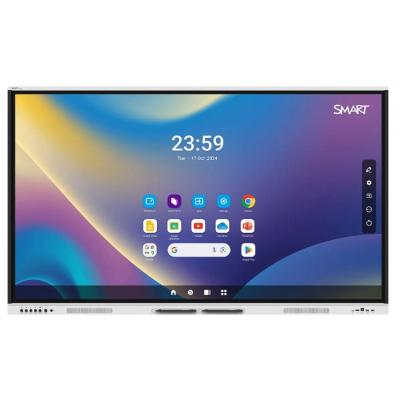
SMART Mount for GX, MX, QX Pro, 6000S, and 7000R series displays
The SMART Mount for GX, MX, QX Pro, 6000S, and 7000R series displays is designed to provide a secure, stable, and professional installation solution for interactive displays used across education, healthcare, corporate, and collaborative environments. As interactive technology continues to become a core part of modern teaching spaces, meeting rooms, training centres, and clinical settings, selecting the correct mounting solution is essential for both safety and operational performance.
A professionally installed SMART display mounting system ensures that large-format interactive screens are positioned correctly for user engagement, ergonomic viewing, and long-term reliability. Whether utilised in a classroom, boardroom, consultation room, or collaborative workspace, the mount plays a critical role in supporting daily functionality while protecting valuable display hardware.
Built for compatibility with multiple SMART display series including GX, MX, QX Pro, 6000S, and 7000R models, this mounting solution offers flexibility for organisations upgrading or standardising their interactive display infrastructure.
Professional Installation Process
Professional installation of SMART interactive display mounts involves a structured process to ensure safety, alignment accuracy, and long-term performance.
The installation process typically begins with a site survey to assess wall structure, room layout, cable routing requirements, and accessibility considerations. Installers will evaluate whether the mounting surface is suitable for supporting the display weight and determine the optimal viewing height based on the intended environment.
Once positioning has been confirmed, the mounting bracket is securely fixed using appropriate wall anchors and fixings suitable for the wall type. Professional installers ensure that weight distribution is evenly managed to maintain stability and compliance with installation standards.
Following bracket installation, the SMART display is carefully mounted and levelled to provide a clean and professional appearance. Cable management solutions are then incorporated to minimise exposed wiring and maintain a tidy installation.
The final stage of installation involves testing display stability, verifying accessibility of ports and controls, and ensuring the interactive display operates correctly within the installed environment.
Professional installation is particularly important for larger interactive displays due to the size, weight, and electrical considerations associated with commercial display systems.
Features & Benefits
Wide SMART Display Compatibility
Designed specifically for SMART GX, MX, QX Pro, 6000S, and 7000R series displays, ensuring reliable compatibility across multiple generations of SMART interactive technologies.
Benefits
- Simplifies procurement for organisations using mixed SMART display models
- Reduces compatibility concerns during upgrades
- Supports standardisation across multiple rooms or facilities
Secure and Stable Construction
Manufactured using durable commercial-grade materials to provide long-term structural reliability for large-format displays.
Benefits
- Enhances display safety
- Reduces movement during touchscreen interaction
- Suitable for high-usage educational and corporate environments
Professional Cable Management
Integrated cable routing options help maintain organised and professional installations.
Benefits
- Reduces cable clutter
- Improves room aesthetics
- Minimises trip hazards and accidental cable damage
Optimised Viewing Position
Supports accurate display positioning to maximise visibility and user accessibility.
Benefits
- Improves collaboration and engagement
- Supports ergonomic viewing angles
- Enhances interactive teaching and presentation experiences
Commercial Environment Suitability
Suitable for:
- Education environments
- NHS and healthcare facilities
- Corporate meeting rooms
- Training centres
- Public sector organisations
Benefits
- Flexible deployment across multiple sectors
- Reliable daily performance
- Supports modern collaborative workflows
Instructions for Use
- Confirm compatibility with the specific SMART display model before installation.
- Ensure the mounting surface is structurally suitable to support both the mount and display weight.
- Install the mounting bracket using appropriate fixings for the wall type.
- Carefully lift and secure the display onto the mounting system using recommended installation procedures.
- Verify that all safety locking mechanisms are correctly engaged.
- Route cables through the integrated cable management system where applicable.
- Confirm display alignment and stability before operational use.
- Periodically inspect mounting hardware and fixings as part of routine maintenance procedures.
Professional installation is recommended for commercial and educational environments.
Comparison Table – SMART Mount vs Alternative Universal Display Mount
| Feature | SMART Mount for GX/MX/QX Pro | Standard Universal Display Mount |
| SMART Display Compatibility | Purpose-built compatibility | May require adapters |
| Installation Accuracy | Optimised for SMART displays | Generic fitting approach |
| Stability During Interaction | High stability for touch interaction | Variable depending on design |
| Cable Management | Integrated professional routing | Limited cable management |
| Professional Appearance | Clean SMART display integration | Generic installation finish |
| Commercial Reliability | Designed for continuous professional use | Varies by manufacturer |
| Multi-Series Support | GX, MX, QX Pro, 6000S, 7000R | Limited compatibility assurance |
Specification Sheet
Product Type
Interactive display wall mount
Compatible Display Series
- SMART GX Series
- SMART MX Series
- SMART QX Pro Series
- SMART 6000S Series
- SMART 7000R Series
Application
Commercial and professional interactive display mounting
Suitable Environments
- Education
- Healthcare
- Corporate
- Public sector
- Training facilities
Installation Type
Wall-mounted
Construction
Commercial-grade steel construction
Cable Management
Integrated cable routing support
Mounting Orientation
Landscape
Professional Installation
Recommended
Frequently Asked Questions
Is this mount compatible with all SMART Board sizes?
Compatibility may vary depending on the display size and VESA configuration. Always confirm compatibility with the exact SMART model before purchase.
Can this mount be used in classrooms?
Yes. The mount is suitable for educational environments and is designed to support interactive classroom use.
Is professional installation required?
Professional installation is strongly recommended, particularly for larger interactive displays used in commercial environments.
Does the mount include cable management?
Yes. The mount supports organised cable routing to maintain a clean installation.
Can the mount support touchscreen interaction?
Yes. The mount is designed to provide stability during regular touchscreen use and interactive collaboration.
Is this suitable for NHS or healthcare environments?
Yes. SMART interactive displays and professional mounting systems are commonly used in healthcare training, meeting, and collaborative environments.
Summary & Conclusion
The SMART Mount for GX, MX, QX Pro, 6000S, and 7000R series displays provides a reliable and professional installation solution for modern interactive display environments. Designed to support secure mounting, improved collaboration, and clean cable management, the system helps organisations maximise the performance and usability of their SMART displays.
Suitable for education, healthcare, corporate, and public sector settings, this mounting solution offers compatibility across multiple SMART display ranges while supporting safe and efficient installation practices.
For organisations investing in interactive technology infrastructure, selecting a dedicated SMART-compatible mounting solution helps ensure long-term reliability, improved user experience, and a professional installation finish.
Authoritative External Links
- SMART Technologies Official Website
- SMART Interactive Displays Information
- Health and Safety Executive UK
- AVIXA Professional AV Standards

SMART Mount
See our full selection:
https://www.nicheofficesolutions.co.uk/it-supplies-manchester/
https://www.nicheofficesolutions.co.uk/it-supplies-leeds/
https://www.nicheofficesolutions.co.uk/office-supplies-liverpool/
https://www.nicheofficesolutions.co.uk/office-supplies-sheffield/
For procurement details, bulk purchasing, and further product information, contact our team today on 01274 965089.
Further information can be found on our blog page: https://www.nicheofficesolutions.co.uk/news-niche/
View our Office YouTube videos https://www.youtube.com/@nicheofficesolutionsltd9953
If you have any additional questions, drop us an email at info@nicheofficesolutions.co.uk


There are no reviews yet.